SERtool User Guide
SERtool identifies enriched regions in biological sequences. You can flexibly define custom parameters to query regions of interest, and leverage precomputed mRNA and protein sequences derived from frameshift mutations to investigate potential links between these enriched regions and biological functions or disease mechanisms.
1. Run SERfilter
Effective use of SERfilter is based on three key components. Understanding each one will help you design accurate and reproducible queries:
-
Pattern : The search pattern can target either amino acid or nucleotide sequences, and takes one of three forms:
① a fixed motif (e.g.,PR/GR);
② a degenerate motif using equivalent residues (e.g.,D-E/PR-GR);
③ a hybrid pattern combining fixed positions with wildcard symbols (e.g.,H.R, where.matches any residue).
This flexibility enables biologically informed queries that account for sequence conservation and variability at both protein and nucleic acid levels. - Organism : SERtool includes precomputed frameshifted proteome sequences for each supported organism, enabling direct scanning of potential alternative protein products resulting from translational frameshifts.
- Parameters : Detection sensitivity is controlled by parameter pairs denoted as (hit, window). A candidate region is considered significant if it contains at least hit occurrences of the query pattern within a sliding window of length window. You may either specify individual (hit, window) points or define a range to automatically generate a series of such parameter combinations for comprehensive scanning.
1.1 Quick Search
In Quick Search, simply set the query pattern, organism, and parameters. By default, a single amino acid uses (14, 20), meaning at least 14 occurrences in any 20-residue window define a target region.
The parameters are auto-calculated based on your pattern length, but you can also override them manually.
1.2 Advanced Settings
Example scenarios are provided below to illustrate potential applications. It should be emphasized that all analysis modes can be fully implemented within Fixed Mode; the purpose of alternative modes is solely to automate the evaluation of multiple (hit, window) parameter points, thereby facilitating a more comprehensive search.
| Condition | Example Pattern | Start | End | Mode | Point(s) | Illustration |
|---|---|---|---|---|---|---|
| Single Class Amino Acid Enrichment | D-E | 20 | 100 | Formula | (18,20)(30,50) | DDDDEEEEEE |
| Fixed Sequence Enrichment | DE | 20 | 100 | Formula | (9,20)(15,50) | DEDEDEDEDE |
| Wildcard Containing Enrichment | H.K | 20 | 100 | Formula | (4,20)(8,50) | HTKHSK |
| Continuous Sequence Enrichment | R | X | X | Fixed | (9,9) | RRRRRRRRR |
| Motif Sequence | KDEL | X | X | Fixed | (1,4) | KDEL |
| Score = 10 | E | 20 | 100 | Score | Built-in defaults | EEEEEEEEEEDE... |
| Proportion = 0.7 | E | 20 | 100 | Proportion | Built-in defaults | EEEDEDEDEE... |
1.3 How to Read the Mode Table
- Fixed Mode : You provide exact
(hit, window)pairs. Best for a single known threshold (e.g.,(9,9)for continuousRruns). - Formula Mode : You define two anchor points, and the tool interpolates the intermediate
(hit, window)pairs across your scanning window range. Best for exploring a range of stringency levels at once. - Score Mode : Uses a Smith-Waterman-derived score threshold. Higher score = stricter. Best for finding strongly enriched regions with a single cut-off.
- Proportion Mode : Requires that at least a given fraction of a window be target residues (e.g., 0.7 = at least 70%
E). Best for dense, near-continuous motifs.
(14,20) to gauge the overall enrichment level, then switch to Formula Mode to sweep a wider range of stringency.
2. Frameshift Sequences Database
SERtool integrates variant data from ClinVar, DepMap, the 1000 Genomes Project, Genomic Data Commons (GDC), and the Single Nucleotide Polymorphism Database (dbSNP). It includes 1,355,621 computationally translated frameshift-altered protein sequences and 1,355,780 mRNA sequences, enabling precise identification of frameshift-induced sequence-enriched regions (SERs).
These sequences can be accessed directly in the section of the SERtool Download page.
Frameshift Sequences Dataset includes four subsets:
Frameshift-Protein_NMDER: protein sequences produced by frameshift mutations;Wildtype-Protein_NMDER: wild-type protein controls;Frameshift-CDS_NMDER: coding sequences produced by frameshift mutations;Wildtype-CDS_NMDER: wild-type coding sequence controls.
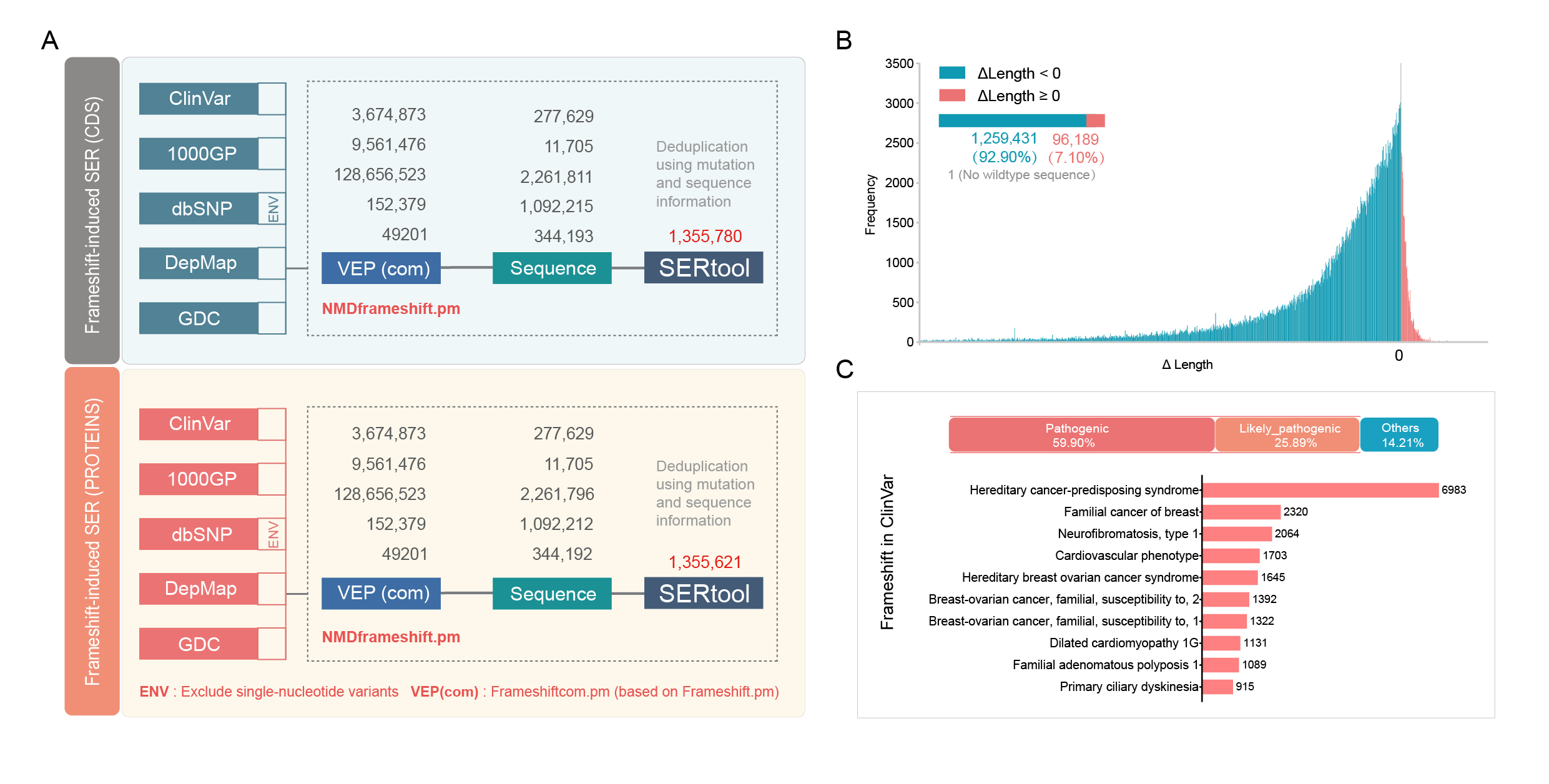
Workflow for generating frameshift-altered sequences and primary database characterization (A) Overview of data integration and processing pipeline. (B) Distribution of length differences between frameshift-mutated and wild-type protein sequences. (C) Proportion of frameshift variants classified as pathogenic/likely pathogenic versus variants of uncertain significance in ClinVar and top 10 diseases associated with frameshift variants based on ClinVar submission counts.
3. Code Availability and Citation
The open-source code for SERtool is publicly available on https://github.com/rennmeng/SERtool, and the tool is registered in https://bio.tools/sertool. Please cite the following when using this tool or dataset: